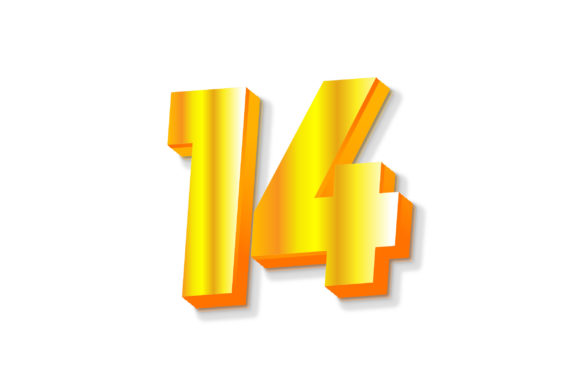
3D Text Design of Letter 14 – Creative and Professional Uses
3D Text Design of Letter 14 is a visually striking graphic element that brings depth, dimension, and style to the number "14" using advanced text modeling techniques. Unlike traditional flat text, this design adds an extra layer of realism by incorporating shadows, lighting, and perspective. It's perfect for anyone looking to elevate their digital or print projects with modern aesthetics.
Why Choose 3D Text Designs?
3D text designs have become increasingly popular in both personal and professional settings due to their ability to capture attention and convey sophistication. The 3D Text Design of Letter 14 stands out because it’s not just about making the number look cool—it's about enhancing the overall visual impact of your work. Whether you're designing a logo, creating social media content, or preparing marketing materials, this design can help you stand out in a crowded space.
Key Features of This Design
- Multiple File Formats: You'll receive the design in AI, EPS, JPEG, PNG (transparent), and SVG formats—offering flexibility for different platforms and uses.
- High Quality: All versions are optimized for clarity and detail, ensuring your visuals remain sharp across screens and prints.
- Artboard Size: The design comes on a 1200px x 1200px artboard, ideal for most web-based applications and easy scaling for larger prints.
- Transparent Backgrounds: PNG files include transparent backgrounds, which are essential for overlaying the design on various colors or images without any hassle.
- Easy to Use: Even if you're new to graphic design, the files are structured in a way that makes editing and customizing simple and intuitive.
Real-World Applications of 3D Text Design of Letter 14
The 3D Text Design of Letter 14 is incredibly versatile. Here are some common ways people use it across different industries and hobbies:
Marketing and Branding
Businesses often use 3D text to create eye-catching logos or promotional banners. For instance, if you're launching a product called "Project 14," this design could serve as the central visual identity. The added dimension helps it pop on websites, billboards, and even packaging materials.
Web and Social Media Design
On platforms like Instagram, Facebook, or your company's website, high-quality 3D text can make posts more engaging. Imagine using the 3D Text Design of Letter 14 in a banner for a special 14th anniversary event. The transparency in PNG format ensures it blends seamlessly with any background you choose.
Print Materials
From posters and flyers to t-shirts and mugs, the 3D Text Design of Letter 14 can be printed at high resolution. Its clean lines and bold structure make it suitable for merchandise, especially when you want to highlight a milestone or celebration tied to the number 14.
Video and Animation Projects
If you're working on motion graphics or explainer videos, the SVG file type allows for smooth animations. The 3D Text Design of Letter 14 can be rotated, scaled, or integrated into transitions to add dynamic flair to your content.
Personal Creations and Artwork
Hobbyists and artists can incorporate this design into digital paintings, greeting cards, or even tattoos. The transparent PNG version works well for layered artwork, while the AI and EPS files let you tweak every detail before finalizing your piece.
Educational and Presentational Uses
Teachers and presenters might use the 3D Text Design of Letter 14 in slideshows or classroom decorations. It can represent a lesson number, a project deadline, or a thematic title in a visually appealing way.
Getting Started with Your 3D Text Design
Even if you're not a seasoned designer, using the 3D Text Design of Letter 14 is straightforward. Most graphic design software such as Adobe Illustrator, Photoshop, or free tools like Canva and Inkscape support the included file types. You can adjust color, size, and orientation to match your project's theme or branding guidelines.
For example, if you're a blogger promoting a blog post titled "14 Tips for Success," you can place the 3D Text Design of Letter 14 as a header image. With the transparent PNG file, the number will blend perfectly with your site's background, making the page more cohesive and professional-looking.
Beginner-Friendly Customization Ideas
- Change the Color: Use the AI or EPS file to recolor the design and match your brand palette.
- Add Effects: Experiment with drop shadows, gradients, or textures to give the design a unique twist.
- Scale for Print: Ensure the design looks great on large-format prints by adjusting its size accordingly.
- Use in Digital Collages: Combine the 3D Text Design of Letter 14 with other elements in your layout to build a compelling visual narrative.
What to Consider Before Using the Design
Before downloading or using the 3D Text Design of Letter 14, there are a few important things to keep in mind:
Licensing and Usage Rights
Always check the licensing terms associated with the design. Some 3D text files may be restricted for commercial use unless purchased under a specific license. If you plan to use the design in a business context, confirm that you have the right to do so.
Software Compatibility
While most modern design tools support AI, EPS, and SVG files, it's wise to verify that your preferred software can open and edit them. If you're using a platform like Canva or Figma, you might need to convert the file or import it as a vector graphic.
Design Aesthetics and Context
Not all 3D text styles fit every project. Think about how the 3D Text Design of Letter 14 complements the rest of your design. Does it feel too futuristic for a vintage-themed poster? Will it distract from the message you're trying to convey? These considerations help ensure the design enhances rather than overshadows your content.
File Quality and Resolution
When using the JPEG or PNG versions, always opt for the highest quality available. Low-resolution images can appear pixelated, especially in print or on high-definition screens. The provided high-quality files are optimized for both digital and physical applications.
Support and Collaboration
Creating with 3D text can sometimes be tricky, especially if you're still learning. Fortunately, the creator behind the 3D Text Design of Letter 14 offers support. If you encounter any issues or need customization assistance, you can reach out via their profile. This kind of access is invaluable for beginners who may not yet be comfortable manipulating complex vector files on their own.
Common Questions and Solutions
Some users ask whether they can modify the design beyond basic color changes. The answer is yes! Because you get editable vector files (AI and EPS), you can reshape the text, change fonts, or integrate additional graphics. Others wonder about the best way to export the design for web use. The transparent PNG file is typically the safest bet for online platforms, but SVG is also excellent for scalable, crisp visuals.
Maximizing Value from This Resource
To truly benefit from the 3D Text Design of Letter 14, consider how it fits into your creative workflow. Maybe you're planning a birthday party for someone turning 14 and want a bold, memorable centerpiece. Or perhaps you're a small business owner celebrating 14 years in operation and need a fresh logo for your anniversary campaign. Either way, this design gives you a strong starting point that’s easy to adapt.
You can also combine multiple instances of the 3D Text Design of Letter 14 in a collage-style design. For example, a fitness trainer might create a motivational poster featuring the number 14 to represent “14 Days to Transform.” The design’s versatility allows it to be used creatively in countless ways.
Where to Start
If you’re unsure how to begin, try these steps:
- Open the AI or EPS file in Adobe Illustrator to explore layers and effects.
- Import the SVG file into Figma or Inkscape for web-friendly editing.
- Drag and drop the PNG file into your favorite photo editor like Photoshop or GIMP for quick adjustments.
Final Thoughts
The 3D Text Design of Letter 14 is more than just a pretty graphic—it's a functional asset that can enhance your projects in meaningful ways. From marketing campaigns to personal art, it offers a professional-grade solution that's accessible to everyone. By understanding its features, limitations, and potential uses, you can make the most of what it has to offer.
If you're ready to bring a touch of creativity and depth to your next design, this resource is an excellent choice. And remember, if you ever need guidance or help, the creator is just a message away. So go ahead—download, customize, and start creating something amazing today!